
Digital Library Management
Calibre is a free, open-source software program that lets you organize, manage, and control your digital book library on your own computer. It runs on Windows, macOS, and Linux, and it does not belong to any retailer, platform, or device ecosystem. That independence is the single most important thing about it.
At its core, Calibre acts as a personal library system for ebooks. It stores your books locally and lets you sort them by author, title, series, series number, genre, tags, publisher, publication date, format, and any custom fields you choose to create. It displays covers, descriptions, and metadata, and it lets you search and filter your collection with the kind of precision that actual readers care about rather than the kind of vague browsing experience retail platforms provide.
Unlike proprietary ebook apps, Calibre does not try to sell you anything. It does not push recommendations. It does not lock your books into a single device or storefront. It does not assume that your reading life belongs to Amazon, Kobo, Apple, or anyone else. It treats your books as files you own and manage, not as licenses you temporarily rent.
DRM (digital rights management) shapes far more of your reading life than most people realize. It decides which devices you can use, which apps you can install, and whether your books remain accessible if you change ecosystems. Calibre does not exist to break rules. It exists because readers deserve a way to organize and preserve their libraries outside the logic of vendor lock-in.
Calibre also handles format conversion, which matters far more than people realize until they switch devices or start caring about long-term access. It can convert between common ebook formats like EPUB (electronic publication), MOBI (Mobipocket), AZW3 (Amazon Kindle format), and PDF (portable document format). That means a book you bought for one device does not have to die on that device when you upgrade, change ecosystems, or decide you want more control over your library.
The program includes an ebook viewer, an editor, and a metadata manager. You can read your books inside Calibre, fix broken metadata, clean up ugly covers, merge duplicate entries, correct series numbers, and standardize how your library looks and behaves. For anyone who cares about order, continuity, or future-proofing, that level of control changes everything.
Living With Your Library Instead of Inside a Store
Calibre also connects directly to many e-readers, which changes how much control you actually have over your device. You can plug in a Kobo, a Kindle, or other supported readers and send books back and forth without relying on cloud syncing, retailer apps, or proprietary software. Instead of surrendering your library to whatever a platform decides to surface or hide, you control what lives on your device, how your collections organize themselves, and which files stay local versus backed up elsewhere.
This local-first approach quietly solves problems that most retailer ecosystems never acknowledge. It assumes you might switch devices, lose account access, or want to preserve your books outside a single company’s infrastructure, and it builds around that reality rather than pretending it will never happen.
Retail ebook platforms optimize for buying and browsing, not for stewardship. They prioritize storefront logic, not long-term library logic. They assume you will always stay inside their ecosystem. Calibre assumes you will not, and it builds everything around that reality.
A Library System, Not a Workaround
People often treat Calibre as a conversion tool or a DRM workaround, which misses what it actually does. At its core, it functions as a real library system. It gives you a way to curate, protect, and maintain a digital collection in the same way people have always curated, protected, and maintained physical book collections, with structure, continuity, and long-term stewardship in mind. Instead of scattering your books across downloads folders, cloud apps, and retailer silos, it pulls everything into a single, coherent personal archive that behaves like an actual library rather than a temporary holding space.
If you read casually, buy only from one store, and never think about long-term access, Calibre may feel unnecessary. If you read heavily, care about ownership, move between devices, or want your books to remain usable ten years from now, Calibre stops feeling optional very quickly.
For me, Calibre became essential the moment I realized that my digital reading life had grown larger than any single platform could responsibly manage. It gave me back control over my library. It gave me consistency. It gave me confidence that the books I paid for would remain readable regardless of which device or retailer I used next.
Not a hack. Not a loophole. Not a niche tech toy. It is a real library system for digital readers who take their collections seriously.
Why Calibre Became Essential for Me
I started using Calibre almost the moment I caved to the idea of ebooks. Even then, something about the way my (now) beloved Kobo e-reader handled organization felt wrong. Its tools worked well enough for browsing storefront categories, but they fell apart as soon as my digital library grew past a few dozen titles. The device seemed designed to help me buy books, not to help me live with them, and that distinction became impossible to ignore once I started digitally reading heavily in long series and shared universes.
For a while, I blamed the hardware and assumed I had simply outgrown what a consumer e-reader could reasonably handle. It didn’t take very long before the real problem revealed itself though, and it had very little to do with Kobo at all. Most of the chaos came from metadata. Authors did not always add series information. Series names changed mid-run. Some books listed the same series under slightly different titles, which split them into separate groups. Series numbers went missing. Universes never appeared. Anthologies floated in limbo. The e-reader did exactly what it had been told to do, and what it had been told to do did not match how real readers think about continuity, order, and story worlds.
Fixing the Chaos the Platforms Ignore
Calibre gave me a way to repair all of that without fighting the device itself or waiting for retailers to fix problems they do not even acknowledge. I built custom columns for universes and universe numbers, because I read a lot of shared-world and multi-arc series that do not behave like neat, linear trilogies. I added a read or not read column, because my reading life depends on knowing what I have already finished and what still waits for me. I combined that status marker with author names and series or universe labels to create a main collection view on my ereader that shows unread books first and read books afterward, so my device always opens to what actually matters next.
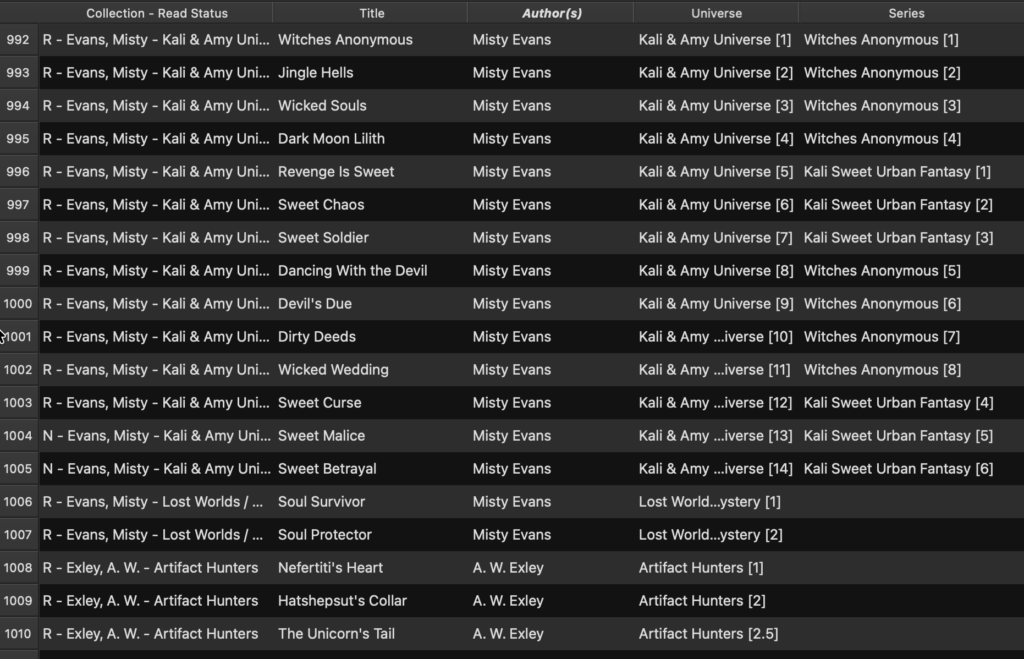
That system quietly reshaped my daily reading behavior in the ways that I wanted it too. Instead of scrolling through an undifferentiated wall of titles, I now see unread books grouped cleanly by story world, with comfort rereads living at the end of of the list instead of cluttering the front. Bulk removal lets me clear finished books from my device in seconds instead of one by one. Anthologies surface instantly instead of floating somewhere in the middle of everything else. Recently added filters let me fix broken metadata the same day instead of discovering mangled series sorting months later. Saved views of large author-invited universes, like Magic and Mayhem, F.U.C. Academy or Nocturne Falls, let me see every guest author contribution lined up in a coherent reading order.
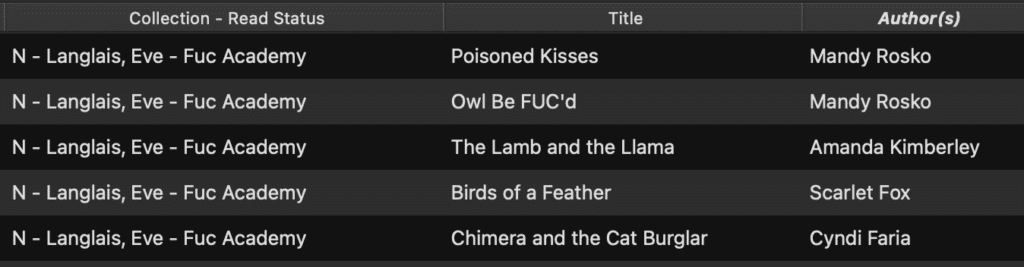
Retailer ecosystems simply do not support that kind of reader logic.
When Reading Became a Closed System
When I first moved into ebooks, Chapters Indigo (now Kobo for ebooks only) dominated the space. Everything lived inside a relatively small, loosely coupled ecosystem, and Calibre felt like a luxury layer for obsessive readers rather than a necessity. Ebooks already existed as downloadable files that people read on computers and early e-readers, and retailers still behaved more like bookstores than closed platforms. When the Kindle arrived, that logic changed. Amazon stopped being just a small ebook retailer and started building a vertically integrated reading ecosystem around its own device, file formats, and delivery system.
Platform exclusivity hardened after that, but not because every company moved in the same direction. Kobo never built its ecosystem this way. Libraries never built their lending systems this way. Even Apple never hardened its ebook platform into a sealed vault. Amazon did that deliberately, and readers now live with the consequences. Device lock-in began shaping where and how people could read, and the entire logic of digital reading shifted away from continuity and toward vendor dependence.
That asymmetry shows up in the file formats themselves. EPUB (electronic publication) remains the standard format used by nearly every other retailer, and Kindle devices can accept EPUB files once they pass through Amazon’s own conversion pipeline. Kindle’s proprietary formats, on the other hand, do not travel nearly as freely. You can move EPUB books into the Kindle ecosystem, but Kindle books do not move cleanly out of it, and that imbalance sits at the heart of why Amazon’s platform behaves less like a bookstore and more like a sealed vault.
I still own a Kindle, not because I like it, but because Amazon forces you to access Amazon books through Amazon hardware or apps. The logic of platform exclusivity hardened as Amazon expanded its ecosystem, and the entire tone of digital reading shifted away from continuity and toward vendor dependence. When Amazon removed the Download and Transfer via USB option in February 2025, it did not surprise me. It confirmed what I already suspected about where their ecosystem was heading and why Calibre had definitely become more than an organizational convenience in my reading life. That moment did not change my reading philosophy, because it only formalized a direction that had already become obvious. It proved that building my library infrastructure outside retailer silos had been the right decision all along.
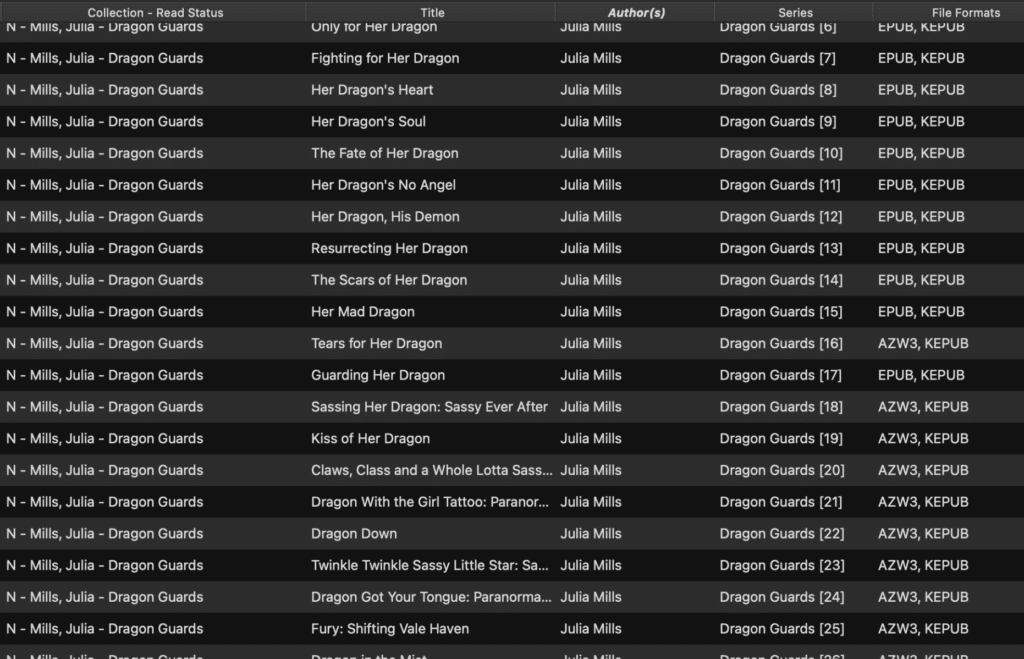
At this point, Calibre does far more than organize my library. It protects it. It lets me convert everything to KEPUB (Kobo EPUB format), so I only have to carry one device. It lets me normalize series names and numbers so my reading order stays coherent. It lets me tag comfort rereads, track word counts, and classify books by actual size rather than vague marketing categories. It gives me a way to live inside my digital library the same way I once lived inside my physical one.
Retailer ecosystems build stores.
Calibre builds a library.
That difference changes everything.
If you use Calibre, I would love to hear how you organize your library and what problems it quietly solved for you. If you do not, I am curious what your current ebook setup looks like and where it starts to feel brittle. Reading lives get complicated fast, and I am always interested in how other readers build systems that actually work.
Leave a Reply